Ladder Editor
Use the ladder editor for rung-based PLC logic that still compiles into the same truST project, runtime, and debug workflow as Structured Text.
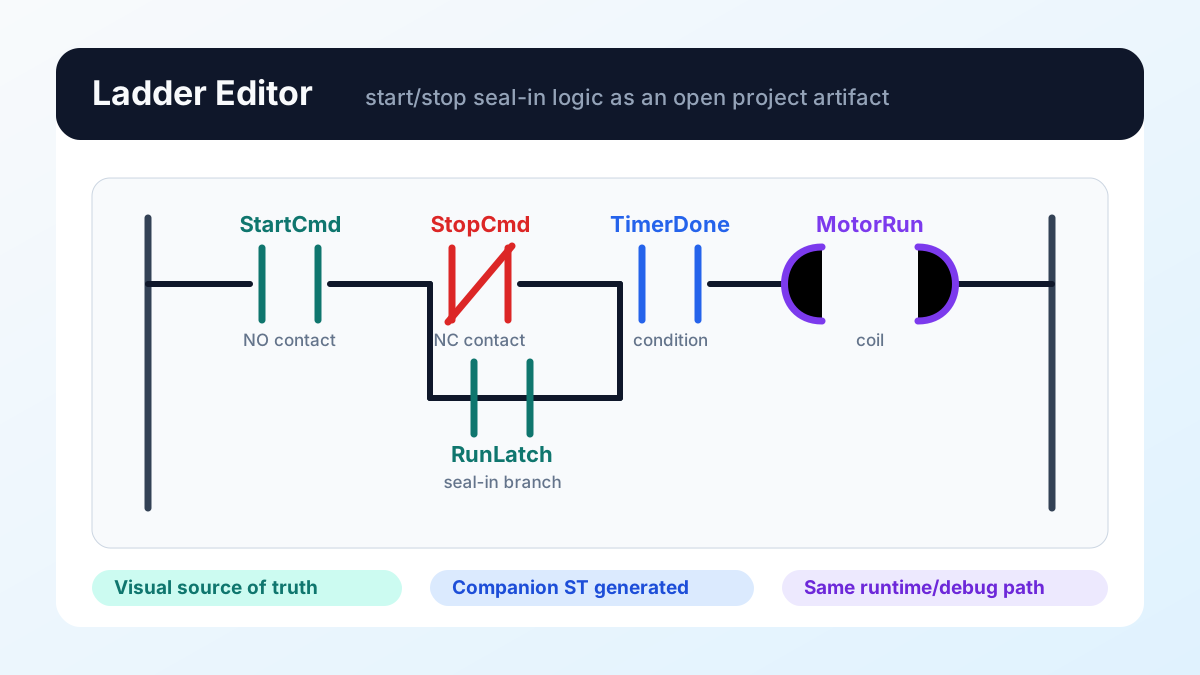
Figure: A start/stop seal-in rung with StartCmd, StopCmd, TimerDone,
RunLatch, and MotorRun. The ladder model is the visual source of truth; the
generated companion ST and runtime/debug path stay in the same truST project.
What it gives you
- rung-based visual authoring
- deterministic companion ST output
- the same runtime/debug path as the rest of truST
Five-step quickstart
- Open
examples/ladder/simple-start-stop.ladder.jsonin VS Code. - Let truST auto-open the custom editor or use
Reopen Editor With.... - Add or inspect contacts/coils in the rung.
- Save the file and inspect the generated companion ST.
- Run the same project through build/validate/runtime as you would for ST.
Best for
- start/stop and seal-in circuits
- timer/counter-heavy control
- teams that already maintain ladder in another PLC environment
When not to use Ladder
- when the logic is mostly state-machine behavior
- when the control flow is primarily step/transition sequencing
- when a straight ST file is simpler than a visual graph
Common mistakes
- treating the diagram as if it had a separate runtime
- editing the generated companion ST directly and expecting the visual model to stay authoritative
- using Ladder for a state machine that would be clearer as Statechart or SFC
Example folder
examples/ladder