AI Assistance
truST exposes project-aware AI tooling in the desktop extension and a separate external Agent API for scripted automation. The boundary is tool scope: editor AI works inside VS Code; Agent API serves external scripts, CI, and repair loops.
Two AI Surfaces
| Surface | Best for | What it can use today |
|---|---|---|
| Editor AI tools | VS Code-side assistance while you are working in the project | ST diagnostics, hover, symbols, definitions, references, completions, signature help, rename edits, formatting edits, code actions, file reads/writes, HMI bindings/layout/patch/validation/preview/journey tools, telemetry, settings, and debug actions |
| Agent API | non-editor automation, CI, repair loops, and harness execution | project info, workspace read/write, diagnostics, formatting, build, validate, test, compile/reload, runtime reload, and deterministic harness methods |
Editor AI Tools
The VS Code extension contributes typed language-model tools instead of asking an AI assistant to guess from free-form text alone.
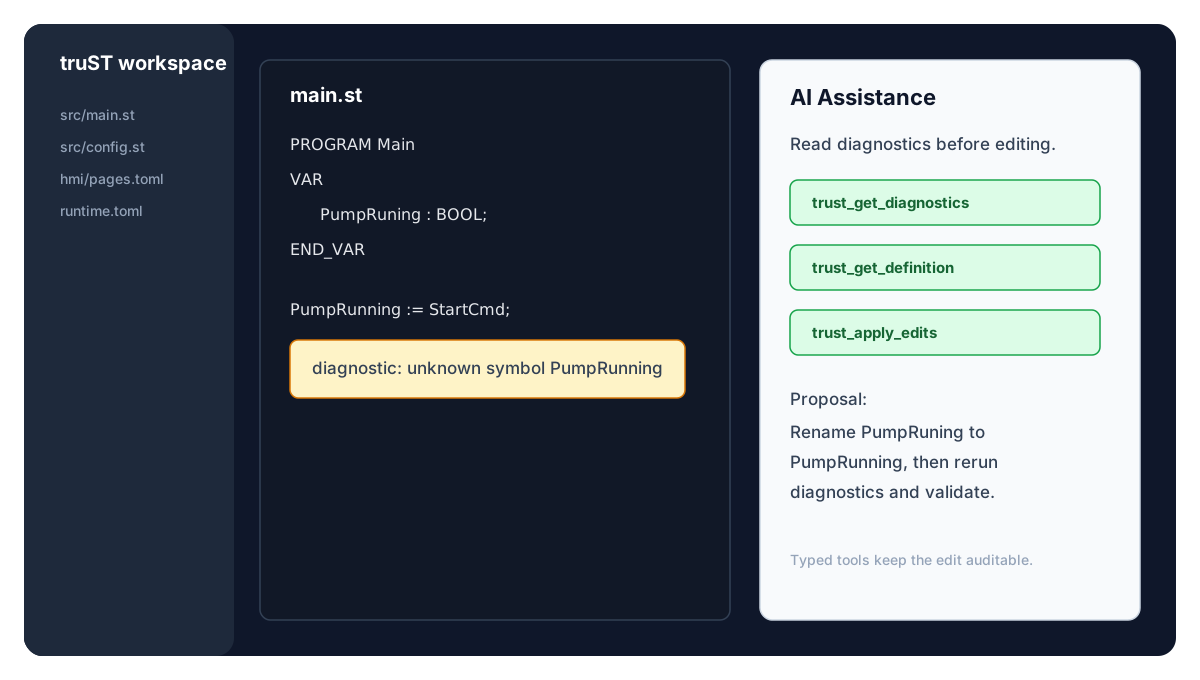
Figure: A VS Code-side AI workflow should call typed truST tools, read diagnostics, apply an auditable edit, and rerun validation instead of guessing from chat context alone.
Figure: AI assistance routes through typed truST tools. The same diagnostics, HMI validation, and runtime/debug paths remain visible to the engineer.
Use the editor AI tools when you want the assistant to:
- read diagnostics before editing
- inspect definitions, references, symbols, hover, completion, or signature help
- read a file or range before applying edits
- preview formatting or rename edits
- inspect HMI bindings and descriptor layout
- apply HMI descriptor patches through typed operations
- validate or preview HMI changes before accepting them
- start, attach, reload, or open the runtime I/O panel for debug-oriented work
Evidence:
- Tool registration lives in editors/vscode/src/lm-tools.ts.
- Tool declarations live in editors/vscode/package.json.
- The desktop extension test suite includes a drift guard in lm-tools-contract.test.ts.
AI Capability Matrix
| Capability | Editor AI tools | Agent API |
|---|---|---|
| read diagnostics | yes, through typed LSP tools | yes, through lsp.diagnostics |
| inspect symbols, definitions, references, hover, signature help | yes | partial; use editor/LSP surfaces for full navigation |
| edit files | yes, through file/range/edit tools | yes, through workspace read/write methods |
| build, validate, and test | no direct editor-AI tool; use CLI or Agent API | yes |
| compile and reload | partial debug/reload helpers | yes, through runtime methods |
| deterministic harness loops | no | yes |
| HMI descriptor planning and validation | yes | no direct v1 HMI authoring surface |
| HMI runtime writes | policy-controlled by runtime/HMI authorization | policy-controlled by runtime/HMI authorization |
Agent API
Use trust-dev agent serve when the AI workflow should be scriptable
outside the editor:
trust-dev agent serve --project ./my-plc
The Agent API is the right path for:
- build, validate, and test loops
- compile/reload loops
- deterministic harness execution
- CI and hosted-worker automation
- repair workflows that need structured machine-readable results
Start here:
Guardrails
AI uses the same validated pathways as human engineers: diagnostics drive edits, typed tool calls expose the available operation, runtime validation confirms the result, and HMI authorization decides whether writes are allowed.
Editor AI tools and Agent API methods have different scopes. Use the One Project, Every Surface matrix when you need the exact boundary.
Useful Prompts
For editor work:
Read the diagnostics for this ST file, inspect the referenced definitions, then propose the smallest edit.
For HMI work:
Inspect the available HMI bindings and current layout, then dry-run a descriptor patch for a readonly status widget.
For automation:
Use the Agent API loop: read project info, run diagnostics, build, validate, and only then propose a reload.